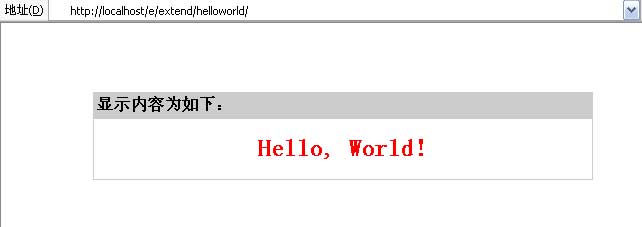
1、显示“Hello,world”
最近更新时间:2026-01-11 0:28:44
| 显示“Hello,world”程序编写例子 |
| 程序代码编写 |
| 存放目录格式: |
| 插件程序存放目录用: |
/e/extend/helloworld/ |
| 插件程序模板存放目录用: |
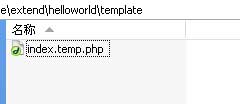
/e/extend/helloworld/template/ |
|
|
| 所需程序文件: |
| /e/extend/helloworld/index.php |
主程序文件 |
| /e/extend/helloworld/template/index.temp.php |
主程序模板文件 |
| 程序目录 |
模板目录 |
 |
|
|
|
|
|
主程序文件内容(/e/extend/helloworld/index.php):
<?php
require('../../class/connect.php'); //引入数据库配置文件和公共函数文件
$link=db_connect(); //连接数据库
$empire=new mysqlquery(); //声明数据库操作类
$editor=1; //声明目录层次$context='Hello, World!'; //定义显示内容
require('template/index.temp.php'); //导入模板文件
db_close(); //关闭数据库链接
$empire=null; //注消操作类变量
?> |
|
主程序模板文件内容(/e/extend/helloworld/template/index.temp.php):
<?php
if(!defined('InEmpireCMS'))
{
exit();
}
?>
<!DOCTYPE HTML PUBLIC "-//W3C//DTD HTML 4.01 Transitional//EN">
<html>
<head>
<meta http-equiv="Content-Type" content="text/html; charset=utf-8">
<title>显示<?=$context?>例子</title>
</head>
<body>
<br>
<br>
<br>
<table width="500" border="0" align="center" cellpadding="3" cellspacing="1" bgcolor="#CCCCCC">
<tr>
<td height="25"><strong>显示内容为如下:</strong></td>
</tr>
<tr>
<td height="60" bgcolor="#FFFFFF"> <div align="center">
<strong><font color="#FF0000" size="5"><?=$context?></font></strong>
</div></td>
</tr>
</table>
</body>
</html> |
说明:模板可用Dreamweaver可视化制作。其中蓝色部分代码为不允许直接访问模板文件的作用。 |
|
| 访问Hello World插件文件主程序:/e/extend/helloworld/index.php |
|